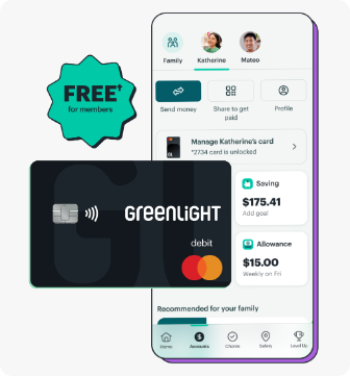
How much does Greenlight cost?
As a First Peoples member, your Greenlight Select subscription is free.ᐩ Or, get an exclusive discount on Infinity Select ($9.99/mo) or Family Shield Select ($18.99/mo), just for being a First Peoples member.
How do I access my free Greenlight subscription?If you’re a First Peoples member, you can sign up for your free
ᐩ subscription
on Greenlight’s website
www.greenlight.com/fpcfcu. If you’re new to First Peoples
and/or a current Greenlight customer, you’ll find instructions on signing up for your free
ᐩaccount there, too.
I signed up through my Financial Institution’s link, but I was just charged a monthly fee.
Please contact Greenlight Customer service by calling (888) 483-2645 or texting (404) 974-3024 and inform them you would like to be added to the First Peoples Community Federal Credit Union partnership program.
Can existing Greenlight customers be added to the program?
Yes! Once existing Greenlight customers add their First Peoples account as a funding source they can reach out to Greenlight customer service and request to be added to the partnership program.
Can I send money to my child’s Greenlight card from First Peoples' app or website?
No, Greenlight is its own individual app, but within the Greenlight app you can send money to your child’s card, turn their card on/off, set up spending controls, allowance, chores and more.
Does Greenlight offer investing^^?
You bet. Kids and teens on our Infinity Select and Family Shield Select plans can use their apps to research and propose trades — with parent approval. All investing portfolios are standard brokerage accounts held in the primary parent’s name.
Is there a minimum age to have a Greenlight card?
We support kids and grownups of all ages. No minimum (or maximum) age here. The Primary must be at least 18 years old and a U.S. resident.
Is this a debit or credit card?
Greenlight is a debit card for kids, not a credit card. Parents load money onto the card from their own funding source connected through their Greenlight app. And because it’s a debit card, kids can’t spend what isn’t there. That’s a pretty valuable life lesson.
Is there an app for kids & older adults?
Kids, parents and older adults will both use the same Greenlight app you see in the app store, but have different experiences and individual login credentials. Parents can set up their child or older adult’s login under their respective profile settings.
How does location sharing* work?
Greenlight Infinity Select's location sharing feature enables seamless sharing across all devices and platforms. Simply toggle between the "family view" to see everyone's location or the "individual view" to focus on one person's location
Is Greenlight safe?
Greenlight debit cards are FDIC-insured up to $250,000 and come with fraud protection through Mastercard’s Zero Liability Protection.
Greenlight also blocks unsafe spending categories, sends real-time transaction notifications, lets parents turn cards off at any time, and gives parents flexible ATM and spend controls.
How do SOS alerts* work?
Greenlight Infinity Select and Family Shield Select's SOS alerts are designed to provide help when you need it. Everyone can set up SOS alerts directly in the app, choosing which family members will receive the alert in case of an emergency. When an SOS alert is activated, whether it's through the Greenlight dashboard or login screen, help is on its way. The alert can be sent to 911, family members, or both.
Is Greenlight safe? Are my funds insured?
Greenlight debit cards are FDIC-insured up to $250,000 and come with Mastercard’s Zero Liability Protection. Parents can block ‘unsafe’ spending categories, receive real-time transaction notifications, and turn cards off at any time.
Can Greenlight card be used Internationally?Yes, the Greenlight card can be used internationally in most countries, and there are no international fees or any foreign transaction fees! For a complete list of countries the card cannot be used
click here.
How long does it take for my debit card to arrive?
After completing registration or requesting a replacement card, your debit card will arrive within 7-10 business days. If you would like to expedite your shipping for your card to arrive within 2-3 business days, you can call our customer service team at 888-483-2645 within 12 hours of signing up. You can request to have your shipping expedited for a
one-time fee of $24.99.
How do I verify my funding source?
Bank Account
If you are prompted to verify your Bank Account when manually adding your funding source, you will receive 2 small deposits of $1.00 or less in your bank account within 1-2 business days. To verify your bank account as a funding source, you will need to input the 2 micro deposit amounts into your Greenlight app when prompted to verify.
If you do not see these deposits within 3 business days, please contact your banking service provider directly and have them take a look at the status of your bank account. Once you complete verification, the 2 micro deposits will be removed from your bank account to offset the deposit amounts.
Debit Card
Once you add your debit card as a funding source and make your initial funding load, you should see 2 transactions on your debit card that add up to the initial load amount. You will need to confirm these transactions within 3 business days in the Greenlight app to verify your debit card.
If you do not see these transactions within 4 business days, please contact your banking service provider directly and have them take a look at the status of your bank account.
How do I activate my child’s Greenlight card?
When your child's card arrives, follow these simple steps to activate it right away:
- Open your Greenlight app. From your Parent Dashboard, you should see a notification prompting you to activate your child’s card.
- Tap on the notification and input the card's expiration date and security code in the app to activate it.
- Next, visit your child's dashboard by clicking their square at the top of your Parent Dashboard.
- Select "Manage Card" then "Set debit card PIN." After the PIN is set, your physical card is activated and ready to use!
How can I check my child's spending history?We have made it super easy to check your child's spending history.
- Navigate to your child's dashboard.
- Click on the Spending tile.
- At the top right, click on "History."
You then have the ability to filter the view to see spending history for the last 30 days, 90 days, or 12 months as well as grouping transactions by stores.
How does money movement work with Greenlight?
In general, funds deposited would be made quickly available to the child given that there’s sufficient funds in the source checking account. The transaction is conducted via ACH transfer and typically would settle the next business day. All funds moved into the Greenlight ecosystem are moved from an externally linked account into the Parent Wallet. These funds can then be distributed, or allocated to children through internal Greenlight fund transfers. Withdrawals are similar, in that funds are removed from the Greenlight ecosystem through the parent wallet. In both cases, funds are moved into or out from the parent wallet via an ACH or debit transaction, using a payment processor. All money transfers within the Greenlight account happen instantaneously.
Does Greenlight work with mobile payments?
Yes! As soon as your child’s card has been activated, they can add their Greenlight card details to Apple Pay or Google Pay to tap and pay in an instant.